
Dental insurance aging report: how to read it, why paid claims stay on it, and how to work it down
What each aging bucket means, the six reasons a claim stays open (two of them are posting problems), a weekly routine to work the report, and when a claim can be written off.
By Dr. Salem Sayegh, general dentist, Glendora, California ·
The short answer: a dental insurance aging report lists every claim the office has sent to insurance that is still open, grouped by age: 0 to 30, 31 to 60, 61 to 90 and over 90 days. Work it weekly, oldest and largest first. Before calling a payer about an old claim, check whether it was actually paid and never posted, because in many offices that is the most common reason a claim is still on the report.
Every practice management system has this report: Dentrix, Eaglesoft and Open Dental all list outstanding claims by age. Most offices print it. Fewer work it, and fewer still notice that it is only as accurate as their posting. In my practice in Glendora, the aging report is the first place a posting backlog shows itself, long before anyone calls it a backlog.
How to read the report
Each row is an open claim: the patient, the payer, the date of service or the date sent, and the amount the office expects from the plan. The columns sort that amount by how long it has been open. The total at the bottom is what the office believes insurers still owe.
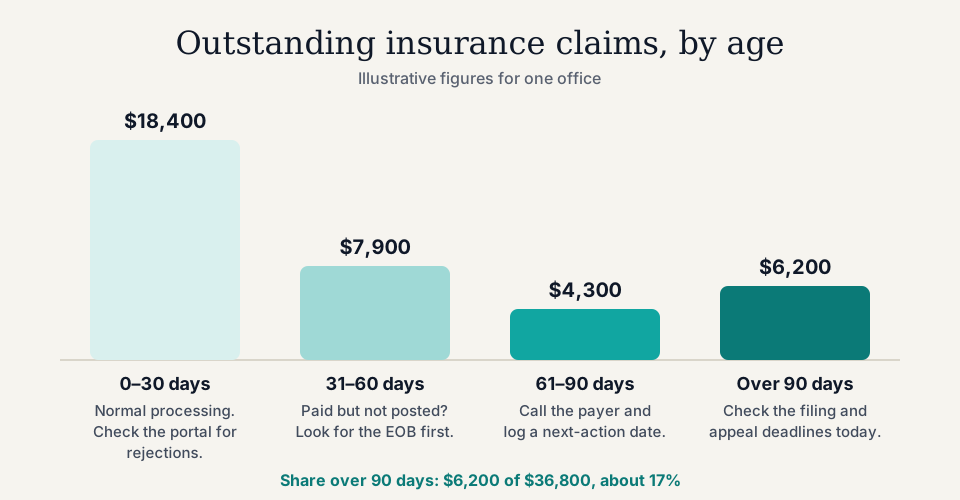
- 0 to 30 days: normal processing time. Check only for clearinghouse rejections.
- 31 to 60 days: most clean claims should be paid by now. Look for the EOB before anything else.
- 61 to 90 days: call or message the payer, and record what they said and when to check again.
- Over 90 days: check the filing and appeal deadlines today. California limits how short a filing deadline a plan may set; see the California dental billing rules.
Why claims stay on the report
A claim leaves the report only when something is posted against it. So an old claim does not always mean an unpaid one. These are the six reasons we see, roughly in the order to check them.
| Reason | What is happening | What to do |
|---|---|---|
| Paid, but the EOB was never posted | The deposit is in the bank; the statement is still in the payer portal | Find the EOB by trace number and post it |
| Denied, but the $0 was never posted | The EOB came back with a denial and was set aside | Post the $0 with its reason, then appeal or correct |
| Never received by the payer | Rejected at the clearinghouse, or sent to the wrong payer ID | Check the clearinghouse report and resend |
| Pended for information | Payer is waiting for x-rays, perio charting or a narrative | Send the attachment and note the date |
| Wrong order of benefits | Sent to the secondary as if it were primary, or primary EOB never sent to the secondary | Confirm primary, rebill in order |
| Payment posted to the account, not the claim | An unapplied credit sits next to an open claim | Move the payment onto the claim’s procedures |
The first two rows are posting problems, not payer problems. If they make up much of your report, the fix is to catch up on posting, covered in how to catch up on a dental insurance posting backlog, not to spend the week on hold with insurers.
A weekly routine to work it down
- Run the report on the same day each week, so the buckets are comparable.
- Sort by age, then by amount. Work the claims that crossed into a new bucket since last week, oldest and largest first.
- Check the portal before the phone. Claim status, payment date and the EOB are usually there. If the claim was paid, post it from the EOB and match it to the deposit.
- Call only when the portal cannot answer. Write down the representative’s name, the call reference number and what they promised.
- Give every claim a next action and a date. Resend, appeal, send an attachment, rebill secondary, or check again on a set day. A claim without a next date is a claim nobody is working.
- Never move a balance to the patient without an EOB. The patient owes only what the plan’s EOB says they owe.
Numbers worth tracking
- Share of insurance AR over 90 days: the over-90 total divided by the total. In the illustration above it is $6,200 of $36,800, about 17 percent. Watch the trend month to month.
- Claims with no next action date: should be zero.
- Days from deposit to posting: if this grows, the aging report will grow with it, because paid claims stay open. Dental insurance payment posting covers the daily routine.
The wider set of measures, including net collection rate and days in AR, is indental revenue cycle management.
When the report is too far gone to trust
If the aging report is full of claims you suspect were paid, working it claim by claim is the slow way round. Start from the bank instead: post every unposted deposit, oldest first, and the report will shrink on its own as paid claims close. What is left is the real follow-up list.
That catch-up is the work we take on for offices in our startup cohort, free: our team onboards your office in person, retrieves the missing EOBs, posts the payments and reconciles the deposits until your aging report reflects what is truly owed. See the free dental billing backlog cleanup.
Sources
- Open Dental manual, Insurance Aging Report.
- California Code of Regulations, title 28, section 1300.71, on claim filing deadlines.
Common questions
What is a dental insurance aging report?
It is a list of every claim the office has sent to insurance that is still open in the practice management system, grouped by how long it has been outstanding: usually 0 to 30, 31 to 60, 61 to 90 and over 90 days. It shows what the office expects insurers to pay and how long each amount has been waiting.
What is the difference between the insurance aging report and the patient aging report?
The insurance aging report lists open claims that insurers are expected to pay. The patient (accounts receivable) aging report lists balances patients owe. A claim moves from one to the other when the EOB is posted and the remaining amount becomes the patient’s share, which is why unposted EOBs make both reports wrong.
Why are there paid claims on my dental insurance aging report?
Because a claim only leaves the report when the payment is posted against it. If the EOB was never downloaded from the payer portal, or the payment was posted to the account instead of the claim, the claim stays open even though the money arrived. Check the payer portal and your deposits before calling the payer.
How often should a dental office work the insurance aging report?
Weekly. Each week, work the claims that crossed into a new bucket, oldest and largest first, and record a next action and date on each one. A report that is printed but not worked is not follow-up.
What is a good percentage of insurance AR over 90 days?
Published targets vary by payer mix, so track your own trend instead of chasing someone else’s benchmark. A rising share over 90 days usually means posting or follow-up has fallen behind, and those claims are closest to the payer’s filing and appeal deadlines.
When should a claim be written off the aging report?
Only for a reason you can name: the EOB shows a contractual write-off, the claim was denied and every appeal deadline has passed, or the office missed the filing deadline and absorbs it under its contract. Never write off a claim just because it is old, and never move it to the patient without an EOB that says the patient owes it.