
Dental billing software: the four kinds, what each does, and how to choose
Practice management systems, clearinghouses, revenue cycle add-ons and AI agents do different jobs. Here is where each one stops and how to match a tool to the gap in your office.
By Dr. Salem Sayegh, general dentist, Glendora, California ·
The short answer: "dental billing software" is four different kinds of product. A practice management system holds the ledger and builds claims. A clearinghouse delivers claims to payers and brings remittances back. Revenue cycle add-ons handle single tasks such as eligibility checks. AI agents do the on-screen work between them. Most offices run two or three together, and the right purchase depends on which gap is costing you time.
The four kinds, compared
| Kind | What it does | Where it stops | Examples |
|---|---|---|---|
| Practice management system | Holds the patient ledger, builds claims, provides the posting screens and aging reports. | It records the work. A person still does most of it. | Dentrix, Eaglesoft, Open Dental, Curve Dental |
| Clearinghouse | Validates claims, routes them to payers, carries attachments, returns ERAs. | Only as good as each payer’s electronic connection. | DentalXChange, Vyne Dental |
| Revenue cycle add-ons | Eligibility checks, claim scrubbing, patient payments, analytics. | Each covers one task and depends on an integration with your system. | Sold by many vendors, often bundled |
| AI agents | Operate the payer portals and the practice management software on screen. | Newer. Needs setup for your workflows and a person to review exceptions. | Sai for Dentists |
Product names are examples of each category, not rankings or endorsements.
1. The practice management system
This is the system of record. Every charge, payment, write-off and patient balance lives in its ledger, and every other billing tool either feeds it or reads from it. Its billing features are real: it builds the claim from the procedures you chart, tracks which claims are outstanding and can import an electronic remittance. What it does not do is go and get anything. A statement sitting in a payer portal stays there until someone fetches it.
2. The clearinghouse
The clearinghouse is the delivery network. It checks each claim against the payer's format rules before sending, which catches rejections early, and it carries attachments such as radiographs and narratives. On the way back it delivers electronic remittance advice for the payers that offer it. Its reach is set by the payers: where a payer has no electronic remittance, the clearinghouse has nothing to hand you.
3. Revenue cycle add-ons
These are single-purpose tools: checking eligibility before the visit, scrubbing claims for coding problems, taking patient payments by text, charting collection trends. Each one can be worth having. Each one is also another login, another subscription and another integration that has to keep working when your practice management system updates.
4. AI agents
An AI agent of the computer-use kind does not connect through an integration. It looks at the screen, moves the pointer and types, the way a person at the front desk does. That lets it work any payer portal and any practice management system, including the ones with no electronic connection between them.
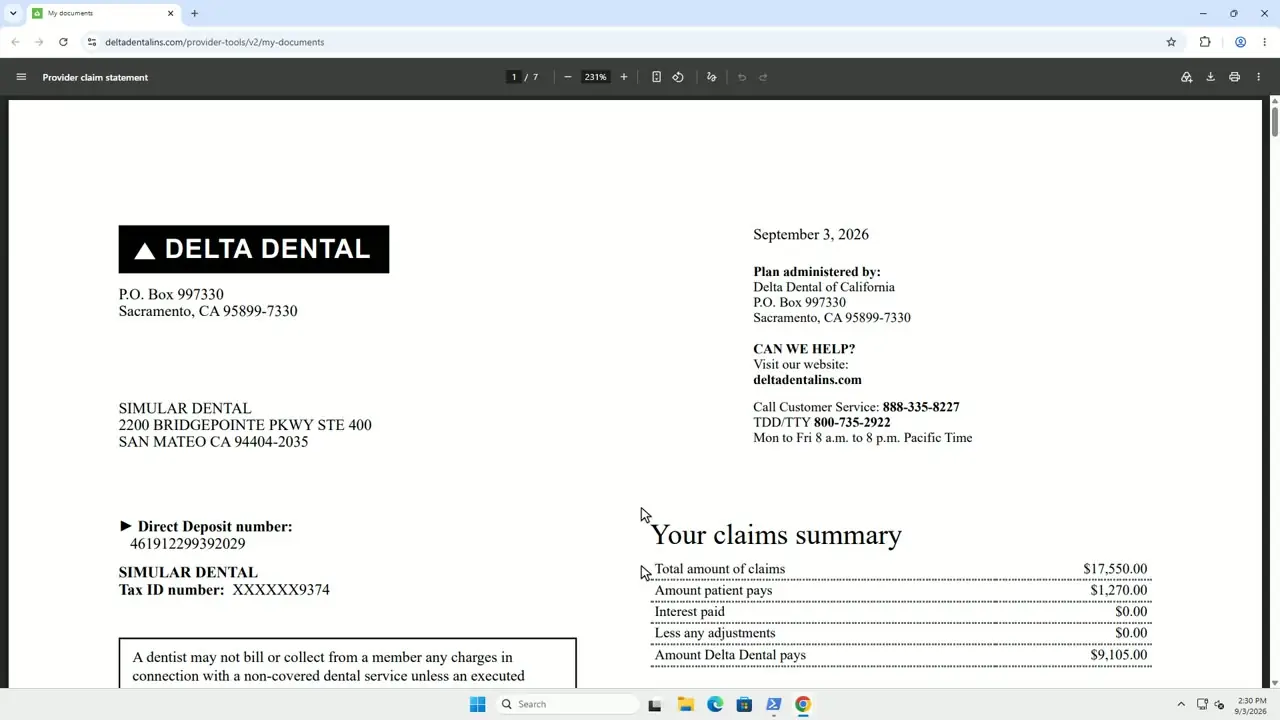
Sai for Dentists is the agent we are building with Simular. It signs in to each payer portal, downloads new statements, reads each claim line, posts the payment and write-off in your practice management software and matches the total against the bank deposit. Denials and anything that does not add up go to your team. It does not replace the practice management system or the clearinghouse. It does the work that sits between them.
How to choose: start from the gap
| If this is the problem | Look at |
|---|---|
| Claims bounce back for missing or malformed data | Clearinghouse, claim scrubbing |
| Coverage surprises at check-in | Eligibility and verification tools |
| Hours spent downloading EOBs and keying payments | ERA enrollment first, then an AI agent for payers without ERAs |
| Deposits that nobody can tie to patients | Reconciliation: a posting process or an agent that matches deposits to remittances |
| Old unpaid claims nobody is chasing | Aging reports in your practice management system, plus someone assigned to work them |
Questions to ask any vendor
- Which of my payers does it cover? Ask for the list, and check it against the payers that make up most of your collections.
- Does it work with my practice management system, and my version of it?
- What happens to the cases it cannot handle? A tool that hides its exceptions creates more work than it saves.
- How is it priced? Per claim, per provider, a percentage of collections, or a fixed amount.
- Where does patient data go, and will you sign a business associate agreement?
If the real question is whether to hand billing to another company, read what outsourced dental billing costs. For what AI can and cannot do in this work, read AI for dental billing.
Common questions
What is dental billing software?
Dental billing software is any program that helps a dental office get paid by insurance: creating and sending claims, receiving remittances, posting payments to the patient ledger and tracking what is still owed. In practice it is four kinds of product that work together: the practice management system, a clearinghouse, revenue cycle add-ons and, more recently, AI agents.
Is Dentrix, Eaglesoft or Open Dental billing software?
Each is a practice management system, and billing is one of its jobs. It holds the ledger, builds the claim and has the screens where payments are posted. It relies on a clearinghouse to deliver claims to payers and to bring electronic remittances back.
What does a dental clearinghouse do?
A clearinghouse sits between the office and the insurers. It checks claims for formatting errors, routes them to each payer electronically, delivers attachments such as X-rays, and returns electronic remittance advice (ERA) files for payers that provide them.
Can dental billing software post insurance payments automatically?
Partly. When a payer sends an ERA, most practice management systems can import it and propose the postings for a person to review. When a payer only puts an EOB in its portal, integration-based software has nothing to import, and the statement is posted by hand or by an AI agent that reads the screen.
What is the best dental billing software?
There is no single best product, because the four kinds do different jobs. Start from the gap in your office. If claims are rejected for formatting, look at the clearinghouse. If eligibility surprises you at the front desk, look at verification tools. If staff spend hours downloading EOBs and keying them in, look at tools that automate posting and reconciliation.
How is an AI agent different from other dental billing software?
Most billing software exchanges data through integrations, so it covers only the payers and systems it is connected to. A computer-use AI agent works the way staff do, through the screen. It can sign in to a payer portal, download a statement and enter the payment in the practice management software without an integration on either side.